


EA SPORTS FC™ 26 Companion
3.55.69K Reviews
App Specs
- Version
- 26.7.1.10821
- Updated On
- License
- Free
- Downloads
- 50,000,000+
- Developer
- ELECTRONIC ARTS
- Categories
- Sports
- Platform
- Android, iOS
Screenshots
 Analysis by AppCompare
There is a particular kind of football-game decision that is easier to make away from the console: spotting a weak link in your squad, weighing up a transfer, or deciding whether a challenge is worth pursuing. That is where EA SPORTS FC™ 26 Companion makes sense to me. It is a free sports game from ELECTRONIC ARTS built around keeping an Ultimate Team in reach, rather than replacing the full match experience. I would think of it as a useful second screen for people who already play, not a standalone way to enjoy every part of football gaming.
The useful first move is a small one
My first practical use would be to open the app with a clear task: check the squad, compare a couple of players, or make one considered market decision. That focus matters. A phone is well suited to reviewing a lineup and making a quick adjustment, but less suited to turning every spare minute into a long session of browsing menus. I find the companion format most appealing when it helps me prepare for the next time I play the main game.
For example, imagine I have a few minutes before heading out. I can look over the team, notice that a position needs attention, and leave myself a plan rather than trying to solve everything on the spot. That is a genuinely convenient use case: the app turns a short pause into a bit of thoughtful team management. It is less compelling if I simply want to play football, because its focus is managing Ultimate Team rather than delivering the full on-pitch experience.
Decisions are the activity, not the match
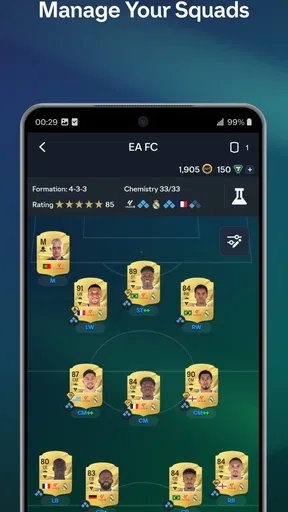
The satisfying part is the decision loop: inspect what I have, make a change, see how the squad looks afterward, then decide what deserves attention next. Squad adjustments, formations, tactics, and player details give that loop a clear football context. I can think through whether a different setup suits the players I have, rather than making changes blindly when I am already in a match.
There is a trade-off, though. Detailed player information can help me compare options, but it can also encourage overthinking. I would use the app to narrow down choices and note a preferred direction, not assume that a stat comparison alone settles every question about how a player will feel in actual play. The companion app is a planning tool; the main game is where a team’s choices have to prove themselves on the pitch.
The market rewards patience as much as tapping
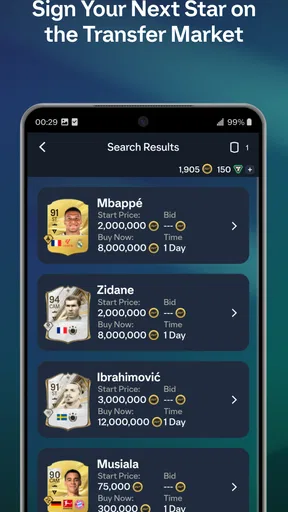
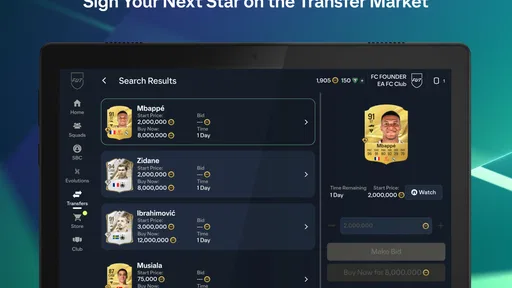
The transfer market is the part I would approach most deliberately. Searching, bidding, and selling from a phone can make small windows of free time useful, but quick access does not automatically make every deal a good one. Before committing, I would decide what the squad actually needs and set a sensible limit for myself. Otherwise, it is easy for market browsing to become the activity instead of a means to improve the team.
A helpful habit is to treat a market visit as a short check-in: identify a position or player type, compare the available choices, then stop if nothing fits. That keeps the process from becoming a stream of reactive bids. It also makes the app a better fit for patient planners than for anyone hoping that constant refreshing will guarantee a bargain. The market can support a strategy; it cannot make an uncertain purchase worthwhile just because it is available on a smaller screen.
Worth Reading Before You Choose

Baby Panda World Brings Quick Play to Modern Phones, but Its Game Library Feels Busy

ESPN’s Live Game View Makes Following Close Games Easier

QuizzLand Review: A Good Fit for Short Trivia Breaks, Not Every Player

Basketball Stars: Multiplayer Is Fast, but Can It Recover When Matches Go Wrong?

WEBTOON Turns Phone Updates Into a Better Reading Routine

Link to Windows Runs on Shared Habits, Not Social Feeds
An All-in-One Football Hub
First off, the EA SPORTS FC™ 26 Companion app is designed to be a seamless extension of your FIFA experience. It’s packed with features that allow you to manage your Ultimate Team on the go. The app is super sleek and intuitive, making it easy to navigate through all its features.
Right from the start, you can manage your squad, adjust your lineups, and even engage in live transfers. It’s like being a virtual manager, only you can do it while waiting in line for coffee. The interface is clean, colorful, and responsive, which makes it perfect for quick, on-the-fly decisions.
Squad Management Made Easy
One of the standout features is the squad management tool. You can swap players in and out of your team with just a few taps. The app provides detailed stats for each player, so you can make informed decisions about who’s going to be your star striker or your solid defender.
It’s also super convenient to tweak tactics and formations. Whether you’re looking to go all-out attack or park the bus, the app gives you the flexibility to adjust your strategy instantly. Plus, you can even customize your kits and stadium to show off your unique style.
Master the Transfer Market
Another feature that deserves a shoutout is the transfer market. The app lets you engage in the buying and selling of players, just like you would in the main game. You can search for players, place bids, and even monitor the market trends right from your phone.
With real-time updates, you can stay ahead of the game and snatch up those hidden gems before anyone else does. It’s a bit like playing the stock market, but way more fun because, well, football.
Stay Connected with Live Events
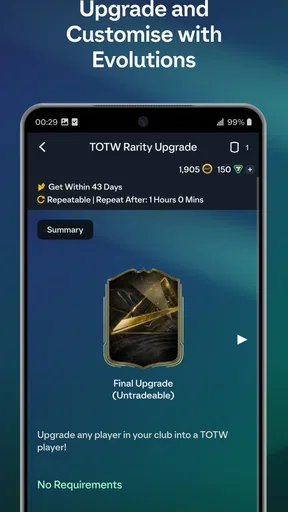
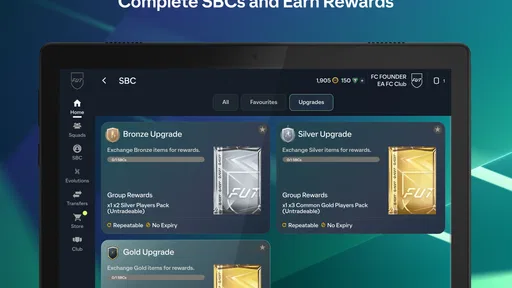
What I love about the app is how it keeps you connected with live events and challenges. You can participate in weekly events and complete squad-building challenges to earn rewards. The thrill of unlocking new packs and getting those rare players is just as exciting on the app as it is on the console.
Plus, the app is constantly updated with new content and challenges, so there’s always something fresh to dive into. It keeps the experience dynamic and engaging, ensuring you’ll never get bored.
User Experience and Design
The design of the app is top-notch. It’s visually appealing with smooth transitions and a user-friendly layout. You don’t need to be a tech guru to figure things out, which is a huge plus. The responsiveness of the app ensures that it runs smoothly, without any annoying lags or crashes.
I also appreciate the little details, like the vibrant graphics and the satisfying sound effects that make interacting with the app a joy. It’s clear that a lot of thought went into making the user experience as seamless as possible.
What the rewards do—and do not—solve
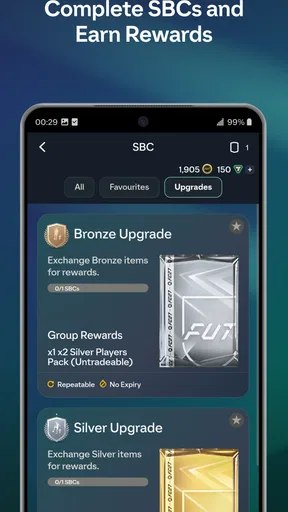
Challenges add a reason to return because they give squad management a goal beyond simply rearranging players. I like that this can turn a spare moment into a concrete plan: check what a challenge asks for, see whether my club can meet it, and decide whether the reward justifies the effort. That last step is important. A reward feels useful only if it supports the kind of team I am trying to build, so I would not complete every challenge automatically.
There is also a natural stopping point here. Once I have reviewed the available tasks and made a choice, I can leave the app and return later rather than continuing to browse just because more menus are available. For me, that is a healthier way to use a companion app: the reward gives the session direction, but it does not need to become a reason to chase every possible pack or player.
Where it fits beside other football games
Compared with a conventional football game on a phone, this experience is much more about administration than controlling players through a match. If I want quick on-pitch action, a mobile football game built around playing matches is the better choice. If I already care about my Ultimate Team in EA SPORTS FC, this app offers a different kind of convenience: squad work and market decisions that can happen between matches instead of taking up time at the console.
It also differs from simply waiting until I am back at the main game. The phone format is handy for short checks and planning, but the smaller screen and touch interface are not automatically better for every task. I would use it when a decision is easy to review at a glance; for extended play or a final judgment about tactics, I would rather return to the main game and see how the team performs.
Who will get the most from it
I think it suits regular Ultimate Team players who enjoy improving a squad, keeping track of opportunities, and having a few management tasks available away from the console. It can also work well for someone who likes to plan before playing: use a quiet moment to review options, then spend the next full session testing the choices in matches. The app is free to download, but it includes in-app purchases, so I would keep spending decisions separate from the excitement of opening rewards.
On the other hand, I would skip it if I do not play EA SPORTS FC’s Ultimate Team or if I want a complete football game that stands on its own. The app’s appeal depends on caring about the club and squad it helps manage. It is also not ideal for someone who finds transfer browsing or repeated team optimisation tedious; those activities are central to its appeal, not chores hidden behind a more varied mobile game.
Compatibility, cost, and a sensible routine
The game is rated Everyone, and its current version is 26.4.0.10509, with Android 10 listed as the minimum OS requirement. Its age rating makes it broadly accessible, but I would still be thoughtful about the in-app purchase range, which runs from $0.89 to $149.99 per item. Those purchases are optional, yet the spread makes it worth deciding in advance whether I am comfortable spending anything at all. A free download does not mean every route through the game is free of temptation.
My practical routine would be simple: check the squad, review one market need or challenge, make a deliberate change, then close the app and save actual match decisions for the main game. That gives each visit a beginning and an end. If the app is unavailable or does not suit the task I have in mind, waiting to manage the team in the main game is a perfectly reasonable alternative; there is no need to force a phone session.
How the loop earns another visit
The appeal comes from a modest cycle: take an action, see how the squad or task has changed, decide whether the result is worth pursuing, and return when there is a fresh reason to manage the team. The reward might give me a new option to consider, while a market decision can reveal that my first plan needs adjusting. That feedback is satisfying when I enjoy the managerial side of football, but it is not the same as the immediate payoff of scoring a goal in a match.
EA SPORTS FC Companion has an average rating of 3.5 from around 659,000 ratings, alongside about 5,700 written reviews, and it has passed 50 million installs. Those figures suggest a large audience, but I would not treat popularity as proof that it will fit everyone. Its strongest use is clear and specific: stay engaged with an existing Ultimate Team, make considered changes in short sessions, and carry a plan into the next time you play.
Final Thoughts
Overall, the EA SPORTS FC™ 26 Companion app is a must-have for any FIFA enthusiast. It’s packed with features that enhance your gaming experience and keep you connected to the world of football wherever you go. Whether you’re managing your squad, trading in the transfer market, or tackling live events, this app has got you covered.
If you haven’t tried it yet, I’d definitely recommend giving it a shot. It’s like having the entire football universe in your pocket, ready to explore whenever you have a spare moment. So go ahead, download it, and take your football managing skills to the next level!
Pros
- Intuitive user interface design.
- Real-time squad management features.
- Seamless integration with console game.
- Regular updates and new content.
- Detailed player statistics available.
Cons
- Requires constant internet connection.
- Limited features for offline users.
- Occasional app crashes reported.
- High data usage for live updates.
- In-app ads can be intrusive.
FAQs for EA SPORTS FC™ 26 Companion
What features does the EA SPORTS FC™ 26 Companion app offer?
The EA SPORTS FC™ 26 Companion app allows you to manage your FUT 26 club on the go. You can open packs, build squads, complete SBCs, and monitor the transfer market. Additionally, you can customize your stadium and earn rewards through various events and challenges.
Is the EA SPORTS FC™ 26 Companion app free to download and use?
Yes, the app is free to download on both Android and iOS devices. However, while the app itself doesn’t require payment, it may include in-app purchases for various game enhancements, packs, and other features that can enhance your gaming experience.
Can I use the EA SPORTS FC™ 26 Companion app without owning the main game?
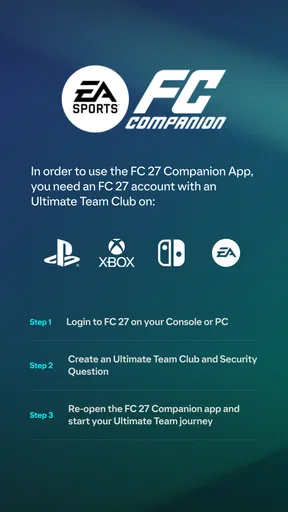
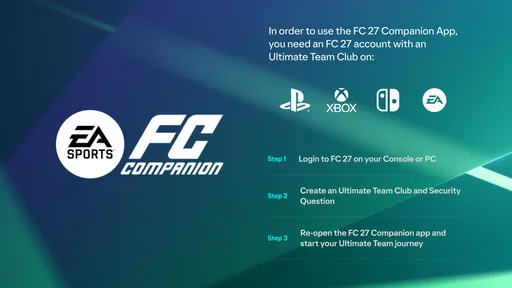
No, to use the EA SPORTS FC™ 26 Companion app effectively, you must have an active EA SPORTS FC 26 account and own the main game on a compatible platform. The app is designed to complement and enhance your experience in the main game.
How does the app help in managing my Ultimate Team?
The app provides a convenient way to manage your Ultimate Team by allowing you to engage in activities like squad building, trading on the transfer market, and completing Squad Building Challenges (SBCs) without needing to be at your console or PC, ensuring you can optimize your team anytime.
Are there any special requirements to use the EA SPORTS FC™ 26 Companion app?
To use the app, you need a stable internet connection and a device that meets the app’s minimum specifications. Additionally, you must have an EA account and have completed the initial FIFA Ultimate Team setup within the main game on your console or PC.


